AI Moderation
AxChat provides a AI check that you can use to moderate your players. This page contains all the information related to how it works and how to use it.
Configuration
modules/moderation.yml
How does it work?
Every user message is sent to the model and the AI responds with a list of confidence percentage scores for each of your defined detections.
If you confidence score is higher than the
punishvalue of the detection, the plugin will run the punishments.
Disclaimers
We are not responsible for the plugin's token usage or the AI models, make sure to set strict budget limits in case anything goes wrong and monitor its usage.
You should disclose to your users what AI model is receiving their messages for their own privacy.
How to set it up?
The AI check uses OpenRouter, so you should create an account first.
You should receive an API key formatted like
sk-or-v1-.... If you haven't, make sure to create a new one at https://openrouter.ai/workspaces/default/keysNext up you need to pick a text model from https://openrouter.ai/models. We suggest choosing cheaper, light models considering that every chat message can use hundreds of tokens. If you are using a paid model, you will have to upload credits at https://openrouter.ai/settings/credits
For this tutorial, lets use the included free model,
Poolside: Laguna S 2.1 (free), click on your selected model and copy the identifier. (you should only use this for testing as it is slow, and it is almost always rate limited)
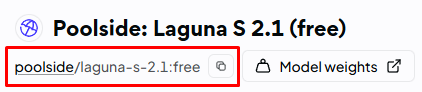
Now that you have got the API Key and the model of your choice, go to the plugins/AxChat/modules/moderation.yml and find the AI check or create a new one using the example at the top of the page.
Make sure to set
enabledto true, so the check will be active.Next, it is time to set your api key and model into the
servicesection like this:
And thats's all, run /axchat reload and test it out! (note that OP users by default have a bypass, so take away their
axchat.moderation.bypasspermission if needed)If you want, you can tweak the detections or add new ones. You can always add more more rules. You can also change the usual settings, like the punishments or the scope of the check.