Testing Premium Plugins
How to start a test server?
You can test all of our paid plugins on BuiltByBit by using the testing server feature for free.
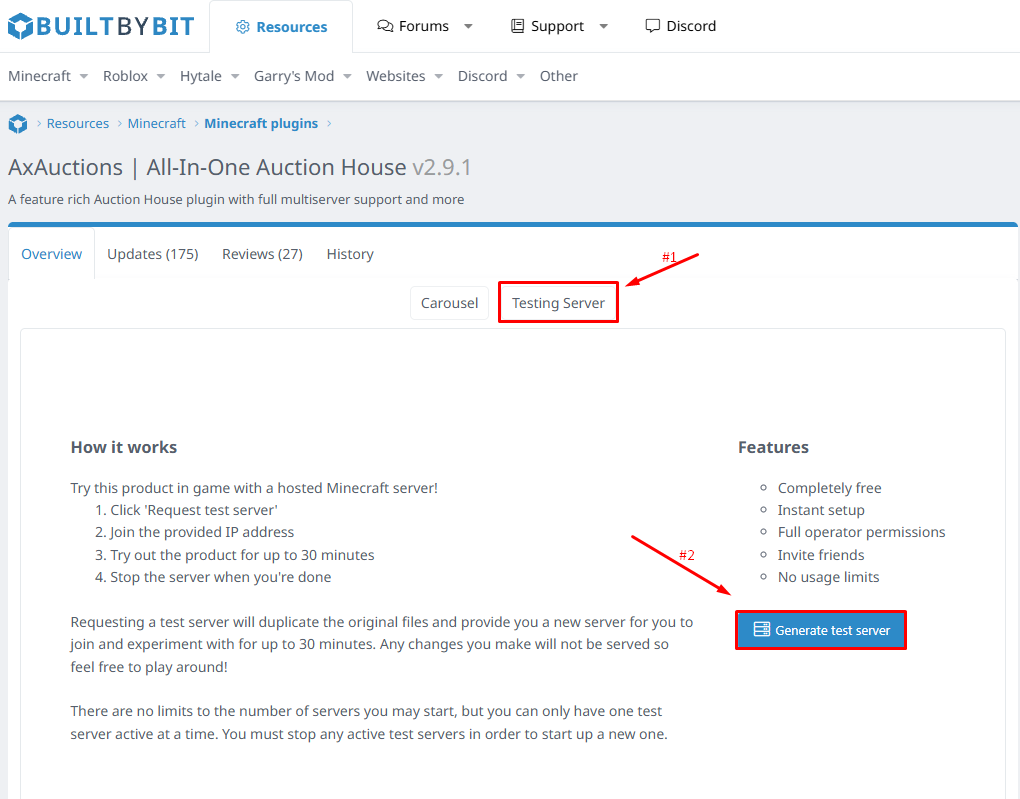
Go to the plugin's BuiltByBit page (or search for it on our profile) and click on the "Testing Server" button right at the top under the title.
Click on the "Generate Test Server" button and wait 30-60 seconds.
Once it has started, you can join and test the plugin on your private testing space.
Good to know
The test servers are private, and you can start/stop them any number of times at any time of the day as you wish.
All the servers have ViaVersion automatically updated in them, so you can always join with the latest Minecraft version (if ViaVersion supports it)
The plugins might not be up to date, so always check using the
/ver plugin nameto see what version is present. Contact us on discord as we are happy to update any of them, so you can try the new features out.You will automatically receive operator permissions when playing on test servers, so you will be playing as an admin.
You can bring friends on the test server to test things out in a group.
None of the plugin features are locked or limited, so you can create anything that would be possible with the real product. (you can't access the configuration files on the test servers)
If you feel that anything is lacking during the test, you can create a feature request even if you don't own the plugin.